Building Omapix: Replacing Photoshop on Linux with Rust and Opus 5.5
An opinionated tech lead with zero Rust knowledge, joined by an AI that writes it allBuilding Omapix: Replacing Photoshop on Linux with Rust and Opus 5.5
This is Part 2 of my switch to Linux. Check out Part 1: the hardware setup to see the three-machine environment driving this.
In my last post, I talked about how a marathon podcast finally broke my excuses and made me move my entire computing life over to Omarchy. But going full-time on Linux brought me face-to-face with the elephant in the room: photo editing.
I’ve tried the existing Linux alternatives over the years. GIMP is the piece of software that originally drove me to pay Adobe for Photoshop in the first place. Krita is an incredible project, but it’s undeniably built from the ground up for digital painters and illustrators. Someone trying to do detailed photo retouching is an afterthought.
The real problem wasn’t missing features. It was having to relearn an entirely alien, friction-heavy workflow to accomplish tasks I’ve done for a decade. The layouts, the odd UI choices, the multi-step dialogs for basic operations, it all felt like fighting the tool rather than working on an image.
I knew how photo editing software should feel. I just needed it to exist on my desktop.
So I started building Omapix.
The tech lead reality: zero Rust lines written
I don’t know Rust, and I’m barely writing the code myself.
If you told a software engineer five years ago that someone with zero systems programming experience was going to architect a multi-crate, tiled image engine with local neural networks, SIMD pixel blending, and Wayland desktop integration, they’d have laughed you out of the room.
Pairing with Claude Opus 5.5 changed the entire dynamic.
On Omapix, I act like an opinionated tech lead. I know photography workflows inside and out. I know how layers should composite, how brush dynamics need to feel under a tablet, how frequency separation should split frequencies, and where controls belong so they don’t get in your way.
Because Omapix is an open-source effort, I have Opus inspect well-established, battle-tested open-source codebases and port time-tested algorithms into modern, idiomatic Rust. When we hit gaps, we design the logic from first principles.
Opus handles the low-level heavy lifting: the borrow checker, memory layouts, concurrency, and tile caching math. I direct the architecture, test the UX, and demand fixes when something feels clumsy. The velocity has been unreal.
Familiar, focused, grounded
If you open Omapix, it won’t feel like an alien cockpit.
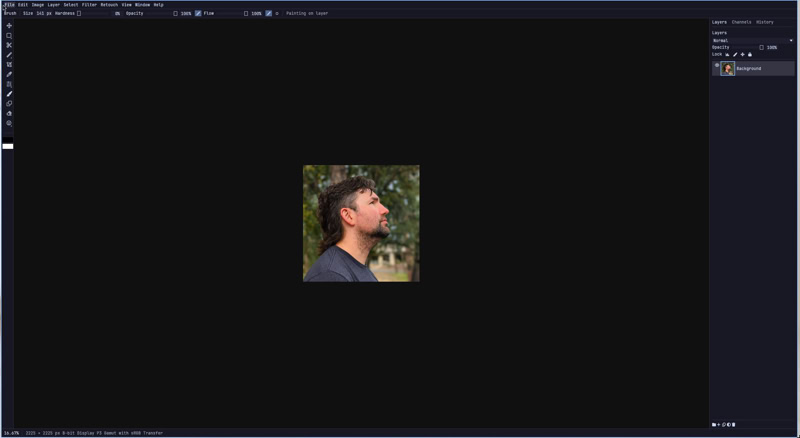
Most great raster editors share a proven visual language: an accessible toolbar on the left, a robust layer stack on the right, history panels, and properties right where your hand expects them. Omapix leans into that familiarity. It’s themed to feel at home alongside native Omarchy applications: clean, intentional, and dark.
One deliberate choice: the editing viewport is strictly non-transparent. A lot of modern Linux tiling setups love glassy, blurred background transparency. That looks neat for a terminal, but when you are judging color values, exposure falloff, or subtle skin texture, any desktop bleed-through behind your canvas will completely ruin your visual judgment. The canvas stays solid and true.
Beyond Omapix: fixing the entire pipeline
Retouching is only the third stage of my photography rhythm. My standard workflow has always been:
- Cull (Adobe Bridge)
- Develop RAWs (Lightroom)
- Retouch (Photoshop)
Omapix tackles the pixel-level retouching void. Once it reaches a reliable daily-driver milestone, I’m building the rest of the ecosystem to ditch Adobe end-to-end.
1. OmaCull (next up): taming the “spray and pray”
When shooting portraits or group sessions, I lean into the “spray and pray” method. If you have four or five people in a frame, the margin for error spikes. Someone is always mid-blink, looking away, or caught in an awkward half-smile. Bursting shots ensures that somewhere in that sequence, there’s a frame where everyone looks their absolute best.
The nightmare is sorting through thousands of shots afterward.
OmaCull will be engineered for instant, zero-lag thumbnail generation and fullscreen 1:1 previews. But the main feature will be local AI training for keeper selection. Instead of a generic model telling you what a “good” photo is, OmaCull will learn your individual taste over time. It will analyze your past picks, learning how you prioritize facial sharpness, open eyes, genuine smiles, and specific framing, and highlight the strongest candidates right off the card dump.
2. OmaLux (the final boss): sane RAW development
Darktable is undeniably powerful, but it suffers from a problem common to decades-old open-source giants: brilliant engineers built layers upon layers of technical complexity over years, making it terrifying to streamline without breaking legacy code.
Take white balance. Darktable literally has multiple white balance modules that can conflict with each other in the processing pipe. Why should a photographer have to referee two competing mathematical algorithms just to warm up a shot?
Or look at copying styles across images. If I spend ten minutes dialing in highlights, shadow recovery, and color temperature on a hero shot, I want to copy those exact adjustments and batch-apply them across twenty neighboring frames in one click. In Darktable, you’re forced into granular checklists, choosing what to include and exclude every single time instead of having the software remember your normal intent.
Things should just work out of the box.
Saving OmaLux for last means every performance lesson we learn from Omapix’s tile renderer and OmaCull’s image caching will feed into a clean, intuitive RAW developer that gives you Lightroom-level immediacy without the labyrinth.
Why open source matters here
Since AI is doing the building, hoarding the result behind proprietary code never made sense to me. Making Omapix open source was the obvious choice. Linux users shouldn’t have to choose between subscription lock-in or clunky interfaces.
Modern desktop hardware has all the compute we need. The tools can be fast, local, and respectful of your workflow.
If you’re on Linux, shoot photos, or just want to see how far an AI-directed Rust project can go, follow along or test the builds on GitHub: github.com/michaelrubi/omapix